'%3e%3cpath%20fill='%2338C3FE'%20d='M21.863%2053.337c5.76%200%2011.288%202.661%2015.381%207.407%204.094%204.745%206.423%2011.19%206.48%2017.935.058%206.745-2.16%2013.243-6.17%2018.084-4.012%204.84-9.493%207.632-15.253%207.767-5.759.135-11.33-2.396-15.505-7.044C2.622%2092.837.183%2086.448.01%2079.706c-.173-6.742%201.933-13.291%205.86-18.225%203.928-4.934%209.36-7.853%2015.116-8.124'/%3e%3cpath%20fill='%2338C3FE'%20d='M116.75%20147.635c0%20.702-.077%201.272-.173%201.279-.096.007-.175-.552-.177-1.253-.002-.702.074-1.284.17-1.305.096-.021.176.527.18%201.228m-5.287%20108.669c0%2014.263-11.467%2025.865-25.705%2026.008-14.239.143-25.936-11.226-26.222-25.486-.286-14.26%2010.947-26.09%2025.18-26.52%2014.232-.429%2026.155%2010.703%2026.727%2024.954m38.583-106.378c0%2013.881-11.16%2025.173-25.018%2025.312-13.858.139-25.242-10.926-25.52-24.804-.278-13.879%2010.654-25.392%2024.506-25.81%2013.852-.418%2025.456%2010.416%2026.012%2024.286m178.563-94.466c11.752%200%2021.312%2011.236%2021.43%2025.187.118%2013.951-9.25%2025.413-21%2025.693-11.751.28-21.499-10.726-21.852-24.672-.354-13.945%208.819-25.628%2020.562-26.187M200.506%2023.19c0%2012.717-11.226%2023.061-25.164%2023.189-13.938.127-25.389-10.01-25.669-22.724C149.394%2010.941%20160.389.393%20174.322.011c13.933-.383%2025.604%209.542%2026.163%2022.249M23.141%2053.325h126.53V23.01H200.5v30.342h128.392v50.886h-40.53c-20.759%2041.552-41.741%2072.901-68.402%20100.113%2013.181%209.003%2031.802%2018.129%2045.975%2022.908-6.905%2019.773-11.906%2034.192-16.109%2047.907-33.629-10.653-50.07-23.448-70.556-36.479-29.384%2019.107-58.583%2035.073-87.298%2042.755l-13.44-50.239c17.843-5.307%2036.552-12.26%2059.466-27.2-11.509-11.228-23.939-26.842-32.851-39.21l38.663-32.5c11.1%2013.742%2021.814%2027.659%2035.013%2040.439%2018.272-17.568%2035.967-38.751%2052.342-68.201H21.799l1.343-51.206Z'/%3e%3c/g%3e%3cdefs%3e%3cfilter%20id='a'%20width='350'%20height='286.262'%20x='0'%20y='0'%20color-interpolation-filters='sRGB'%20filterUnits='userSpaceOnUse'%3e%3cfeFlood%20flood-opacity='0'%20result='BackgroundImageFix'/%3e%3cfeBlend%20in='SourceGraphic'%20in2='BackgroundImageFix'%20result='shape'/%3e%3cfeColorMatrix%20in='SourceAlpha'%20result='hardAlpha'%20values='0%200%200%200%200%200%200%200%200%200%200%200%200%200%200%200%200%200%20127%200'/%3e%3cfeOffset%20dy='4'/%3e%3cfeGaussianBlur%20stdDeviation='2'/%3e%3cfeComposite%20in2='hardAlpha'%20k2='-1'%20k3='1'%20operator='arithmetic'/%3e%3cfeColorMatrix%20values='0%200%200%200%200%200%200%200%200%200%200%200%200%200%200%200%200%200%200.25%200'/%3e%3cfeBlend%20in2='shape'%20result='effect1_innerShadow_1280_13'/%3e%3c/filter%3e%3c/defs%3e%3c/svg%3e)

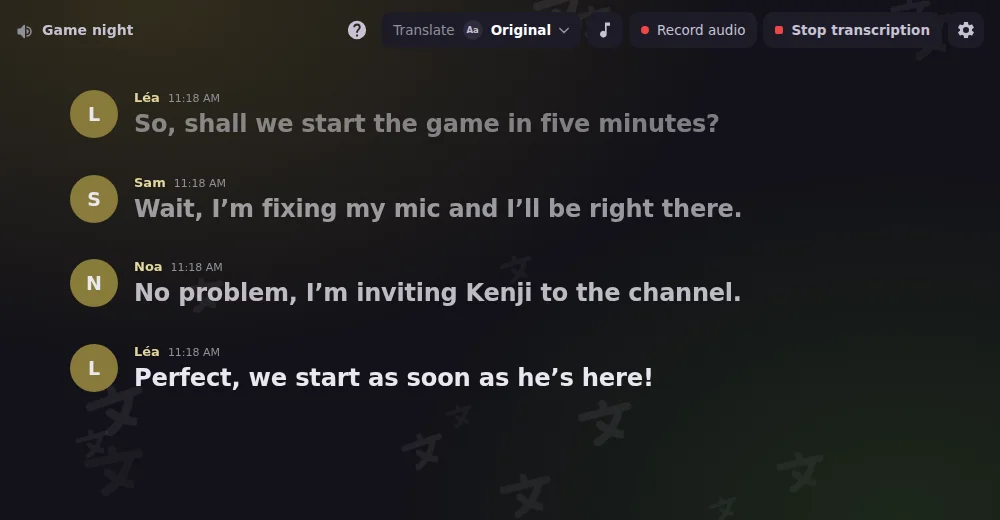
ボイスチャンネルでライブ
Discord アクティビティ
ボイスチャンネルで Interaction Bot をアクティビティとして起動:文字起こし、翻訳、録音、再生を1つのパネルで。
Discord アクティビティについてもっと見るJoin to create
Temporary voice channels
Members join a « Join to create » channel and get their own voice room, which they rename, limit, lock or hide. It disappears once everyone has left.
Temporary voice channelsについてもっと見るユーザーアプリ
Interaction Bot、あなたのアカウントで
Interaction Botをユーザーアプリとしてインストールすれば、ボットが追加されていないサーバーやDMを含め、Discord上のどこでも翻訳できます。
Interaction Bot、あなたのアカウントでについてもっと見る翻訳は無料。無制限です。
料金も投票も不要で、サーバー全体をすべての言語で翻訳できます。
文字数制限なし
どれだけ長いメッセージでも、何件でも翻訳できます。
1日の上限なし
コミュニティは一日中話せて、何もブロックされることはありません。
投票は不要
翻訳するために投票する必要は一切ありません。そのまま使えます。
Frequently asked questions
What is the best free Discord translator bot?
Interaction Bot is a free AI-powered Discord translator bot: it translates messages into over 100 languages, automatically for a channel, a category or a role, or on demand with a flag reaction or a right-click. Translation has no character quota, no daily cap and no vote.
How do I auto-translate a Discord channel?
Add Interaction Bot to your server, open the dashboard, pick the channel, the role or the category and choose the languages. Every new message is then translated automatically, with the author's name and avatar. You can also link channels in a mirror.
Does the bot have a text to speech (TTS) mode?
Yes. The TTS bot reads messages aloud in your voice channel in 52 languages. Use /tts start or /tts say, or turn a text channel into a TTS channel. It is free with a vote.
Can Interaction Bot transcribe voice channels (speech to text)?
Yes. Speech to text posts live captions of a voice channel in a text channel, speaker by speaker, in many languages. The transcript can also be translated into the language you choose.
Can it record a voice channel?
Multitrack voice recording, with one separate track per speaker for podcasts and sessions, is coming in the next update. A Voice recording tab is already in the dashboard.
Can I translate messages on servers where the bot is not added?
Yes. Install Interaction Bot as a user app on your own account, then right-click any message and choose Translate, even in DMs and group DMs.
数分で利用開始
- 1
ボットを追加. ワンクリックで、Interaction Botをあなたのサーバーに招待します。
- 2
設定する. ダッシュボードで、チャンネル、言語、オプションを選択します。コマンドは不要です。
- 3
お楽しみください. 翻訳、音声、FAQは、24時間365日、自動で動作します。
Interaction-Bot
音声とテキストのためのオールインワン Discord ボット


Copyright © 2020 - 2026