Kostenlos, ohne Limit
Übersetzung
Überwinde die Sprachbarriere. Interaction Bot übersetzt deine Discord-Nachrichten automatisch oder auf Abruf in über 100 Sprachen.
Kostenloser Discord-Übersetzer-Bot'%3e%3cpath%20fill='%2338C3FE'%20d='M21.863%2053.337c5.76%200%2011.288%202.661%2015.381%207.407%204.094%204.745%206.423%2011.19%206.48%2017.935.058%206.745-2.16%2013.243-6.17%2018.084-4.012%204.84-9.493%207.632-15.253%207.767-5.759.135-11.33-2.396-15.505-7.044C2.622%2092.837.183%2086.448.01%2079.706c-.173-6.742%201.933-13.291%205.86-18.225%203.928-4.934%209.36-7.853%2015.116-8.124'/%3e%3cpath%20fill='%2338C3FE'%20d='M116.75%20147.635c0%20.702-.077%201.272-.173%201.279-.096.007-.175-.552-.177-1.253-.002-.702.074-1.284.17-1.305.096-.021.176.527.18%201.228m-5.287%20108.669c0%2014.263-11.467%2025.865-25.705%2026.008-14.239.143-25.936-11.226-26.222-25.486-.286-14.26%2010.947-26.09%2025.18-26.52%2014.232-.429%2026.155%2010.703%2026.727%2024.954m38.583-106.378c0%2013.881-11.16%2025.173-25.018%2025.312-13.858.139-25.242-10.926-25.52-24.804-.278-13.879%2010.654-25.392%2024.506-25.81%2013.852-.418%2025.456%2010.416%2026.012%2024.286m178.563-94.466c11.752%200%2021.312%2011.236%2021.43%2025.187.118%2013.951-9.25%2025.413-21%2025.693-11.751.28-21.499-10.726-21.852-24.672-.354-13.945%208.819-25.628%2020.562-26.187M200.506%2023.19c0%2012.717-11.226%2023.061-25.164%2023.189-13.938.127-25.389-10.01-25.669-22.724C149.394%2010.941%20160.389.393%20174.322.011c13.933-.383%2025.604%209.542%2026.163%2022.249M23.141%2053.325h126.53V23.01H200.5v30.342h128.392v50.886h-40.53c-20.759%2041.552-41.741%2072.901-68.402%20100.113%2013.181%209.003%2031.802%2018.129%2045.975%2022.908-6.905%2019.773-11.906%2034.192-16.109%2047.907-33.629-10.653-50.07-23.448-70.556-36.479-29.384%2019.107-58.583%2035.073-87.298%2042.755l-13.44-50.239c17.843-5.307%2036.552-12.26%2059.466-27.2-11.509-11.228-23.939-26.842-32.851-39.21l38.663-32.5c11.1%2013.742%2021.814%2027.659%2035.013%2040.439%2018.272-17.568%2035.967-38.751%2052.342-68.201H21.799l1.343-51.206Z'/%3e%3c/g%3e%3cdefs%3e%3cfilter%20id='a'%20width='350'%20height='286.262'%20x='0'%20y='0'%20color-interpolation-filters='sRGB'%20filterUnits='userSpaceOnUse'%3e%3cfeFlood%20flood-opacity='0'%20result='BackgroundImageFix'/%3e%3cfeBlend%20in='SourceGraphic'%20in2='BackgroundImageFix'%20result='shape'/%3e%3cfeColorMatrix%20in='SourceAlpha'%20result='hardAlpha'%20values='0%200%200%200%200%200%200%200%200%200%200%200%200%200%200%200%200%200%20127%200'/%3e%3cfeOffset%20dy='4'/%3e%3cfeGaussianBlur%20stdDeviation='2'/%3e%3cfeComposite%20in2='hardAlpha'%20k2='-1'%20k3='1'%20operator='arithmetic'/%3e%3cfeColorMatrix%20values='0%200%200%200%200%200%200%200%200%200%200%200%200%200%200%200%200%200%200.25%200'/%3e%3cfeBlend%20in2='shape'%20result='effect1_innerShadow_1280_13'/%3e%3c/filter%3e%3c/defs%3e%3c/svg%3e)
Kostenlos, ohne Limit
Überwinde die Sprachbarriere. Interaction Bot übersetzt deine Discord-Nachrichten automatisch oder auf Abruf in über 100 Sprachen.
Kostenloser Discord-Übersetzer-BotKostenlos mit einer Abstimmung
Schreibe eine Nachricht, und der Bot liest sie in deinem Sprachkanal vor, in 52 Sprachen.
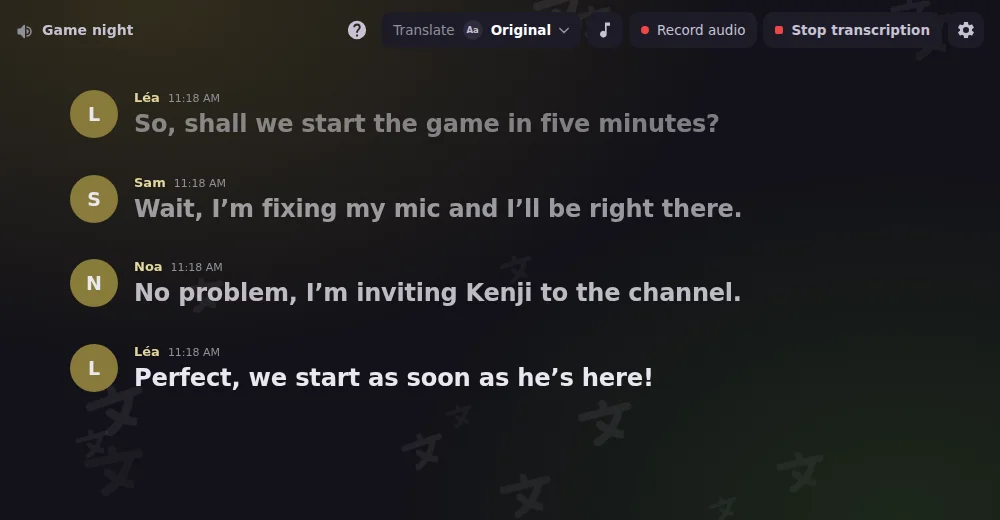
Discord-Text-to-Speech-Bot (TTS)Live-Transkription
Wandle das, was im Sprachkanal gesagt wird, live in Text um. Nichts geht verloren, auch nicht für Menschen, die nicht hören können.
Discord-Speech-to-Text-BotKostenlos
Beantworte dieselben Fragen nicht immer wieder. Erstelle eine FAQ, und der Bot antwortet in der Sprache des Mitglieds.
Mehr über Fragen beantworten erfahrenMehrspuraufnahme
Nimm Stimme und Audio eines Sprachkanals auf, mit einer eigenen Spur pro Sprecher, bereit für den Schnitt deiner Podcasts und Sessions.
Mehr über Sprachaufnahme erfahrenLive im Sprachkanal
Starte Interaction Bot als Aktivität in einem Sprachkanal: Transkription, Übersetzung, Aufnahme und Wiedergabe in einem Panel.
Mehr über Discord-Aktivität erfahrenJoin to create
Members join a « Join to create » channel and get their own voice room, which they rename, limit, lock or hide. It disappears once everyone has left.
Mehr über Temporary voice channels erfahrenBenutzer-App
Installiere Interaction Bot als Benutzer-App: Übersetze überall auf Discord, sogar auf Servern und in DMs, auf denen der Bot nicht hinzugefügt ist.
Mehr über Interaction Bot, auf deinem eigenen Konto erfahrenÜbersetze deinen ganzen Server in jede Sprache, ohne jemals zu bezahlen oder abzustimmen.
Übersetze Nachrichten jeder Länge, so viele du möchtest.
Deine Community kann den ganzen Tag reden, nichts wird jemals blockiert.
Du musst nie abstimmen, um zu übersetzen. Es funktioniert einfach.
Interaction Bot is a free AI-powered Discord translator bot: it translates messages into over 100 languages, automatically for a channel, a category or a role, or on demand with a flag reaction or a right-click. Translation has no character quota, no daily cap and no vote.
Add Interaction Bot to your server, open the dashboard, pick the channel, the role or the category and choose the languages. Every new message is then translated automatically, with the author's name and avatar. You can also link channels in a mirror.
Yes. The TTS bot reads messages aloud in your voice channel in 52 languages. Use /tts start or /tts say, or turn a text channel into a TTS channel. It is free with a vote.
Yes. Speech to text posts live captions of a voice channel in a text channel, speaker by speaker, in many languages. The transcript can also be translated into the language you choose.
Multitrack voice recording, with one separate track per speaker for podcasts and sessions, is coming in the next update. A Voice recording tab is already in the dashboard.
Yes. Install Interaction Bot as a user app on your own account, then right-click any message and choose Translate, even in DMs and group DMs.
Bot hinzufügen. Lade Interaction Bot mit einem Klick auf deinen Server ein.
Konfigurieren. Wähle Kanäle, Sprachen und Optionen im Dashboard. Kein Befehl nötig.
Genießen. Übersetzung, Sprache und FAQ laufen von selbst, rund um die Uhr.
Der All-in-one-Discord-Bot für Sprache und Text


Copyright © 2020 - 2026