Free, no limit
Translation
Break the language barrier. Interaction Bot translates your Discord messages into over 100 languages, automatically or on demand.
Free Discord translator bot'%3e%3cpath%20fill='%2338C3FE'%20d='M21.863%2053.337c5.76%200%2011.288%202.661%2015.381%207.407%204.094%204.745%206.423%2011.19%206.48%2017.935.058%206.745-2.16%2013.243-6.17%2018.084-4.012%204.84-9.493%207.632-15.253%207.767-5.759.135-11.33-2.396-15.505-7.044C2.622%2092.837.183%2086.448.01%2079.706c-.173-6.742%201.933-13.291%205.86-18.225%203.928-4.934%209.36-7.853%2015.116-8.124'/%3e%3cpath%20fill='%2338C3FE'%20d='M116.75%20147.635c0%20.702-.077%201.272-.173%201.279-.096.007-.175-.552-.177-1.253-.002-.702.074-1.284.17-1.305.096-.021.176.527.18%201.228m-5.287%20108.669c0%2014.263-11.467%2025.865-25.705%2026.008-14.239.143-25.936-11.226-26.222-25.486-.286-14.26%2010.947-26.09%2025.18-26.52%2014.232-.429%2026.155%2010.703%2026.727%2024.954m38.583-106.378c0%2013.881-11.16%2025.173-25.018%2025.312-13.858.139-25.242-10.926-25.52-24.804-.278-13.879%2010.654-25.392%2024.506-25.81%2013.852-.418%2025.456%2010.416%2026.012%2024.286m178.563-94.466c11.752%200%2021.312%2011.236%2021.43%2025.187.118%2013.951-9.25%2025.413-21%2025.693-11.751.28-21.499-10.726-21.852-24.672-.354-13.945%208.819-25.628%2020.562-26.187M200.506%2023.19c0%2012.717-11.226%2023.061-25.164%2023.189-13.938.127-25.389-10.01-25.669-22.724C149.394%2010.941%20160.389.393%20174.322.011c13.933-.383%2025.604%209.542%2026.163%2022.249M23.141%2053.325h126.53V23.01H200.5v30.342h128.392v50.886h-40.53c-20.759%2041.552-41.741%2072.901-68.402%20100.113%2013.181%209.003%2031.802%2018.129%2045.975%2022.908-6.905%2019.773-11.906%2034.192-16.109%2047.907-33.629-10.653-50.07-23.448-70.556-36.479-29.384%2019.107-58.583%2035.073-87.298%2042.755l-13.44-50.239c17.843-5.307%2036.552-12.26%2059.466-27.2-11.509-11.228-23.939-26.842-32.851-39.21l38.663-32.5c11.1%2013.742%2021.814%2027.659%2035.013%2040.439%2018.272-17.568%2035.967-38.751%2052.342-68.201H21.799l1.343-51.206Z'/%3e%3c/g%3e%3cdefs%3e%3cfilter%20id='a'%20width='350'%20height='286.262'%20x='0'%20y='0'%20color-interpolation-filters='sRGB'%20filterUnits='userSpaceOnUse'%3e%3cfeFlood%20flood-opacity='0'%20result='BackgroundImageFix'/%3e%3cfeBlend%20in='SourceGraphic'%20in2='BackgroundImageFix'%20result='shape'/%3e%3cfeColorMatrix%20in='SourceAlpha'%20result='hardAlpha'%20values='0%200%200%200%200%200%200%200%200%200%200%200%200%200%200%200%200%200%20127%200'/%3e%3cfeOffset%20dy='4'/%3e%3cfeGaussianBlur%20stdDeviation='2'/%3e%3cfeComposite%20in2='hardAlpha'%20k2='-1'%20k3='1'%20operator='arithmetic'/%3e%3cfeColorMatrix%20values='0%200%200%200%200%200%200%200%200%200%200%200%200%200%200%200%200%200%200.25%200'/%3e%3cfeBlend%20in2='shape'%20result='effect1_innerShadow_1280_13'/%3e%3c/filter%3e%3c/defs%3e%3c/svg%3e)
Free, no limit
Break the language barrier. Interaction Bot translates your Discord messages into over 100 languages, automatically or on demand.
Free Discord translator botFree with a vote
Write a message and the bot reads it aloud in your voice channel, in 52 languages.
Discord text to speech (TTS) botLive transcription
Turn what people say in a voice channel into text, live. Nothing is missed, even by those who can't listen.
Discord speech to text botFree
Stop answering the same questions again and again. Build a FAQ and let the bot reply, in the language of the member.
Learn more about Question AnsweringMultitrack recording
Record the voice and audio of a voice channel, one separate track per speaker, ready to edit your podcasts and sessions.
Learn more about Voice recordingLive in voice
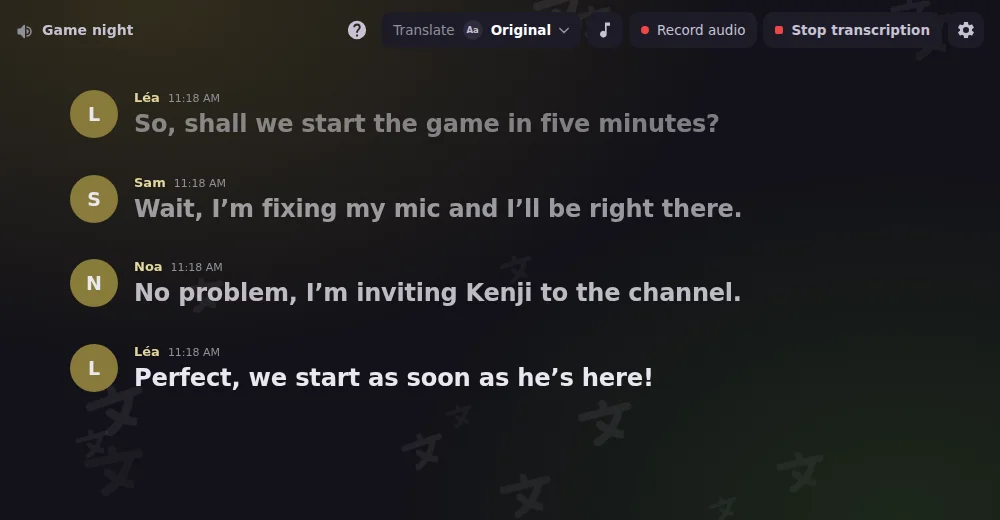
Launch Interaction Bot as an activity in a voice channel: live transcript, live translation, recording and playback in one panel.
Learn more about Discord ActivityJoin to create
Members join a « Join to create » channel and get their own voice room, which they rename, limit, lock or hide. It disappears once everyone has left.
Learn more about Temporary voice channelsUser app
Install Interaction Bot as a user app: translate anywhere on Discord, even in servers and DMs where the bot isn't added.
Learn more about Interaction Bot, on your own accountTranslate your whole server, in every language, without ever paying or voting.
Translate messages of any length, as many as you want.
Your community can talk all day long, nothing is ever blocked.
You never have to vote to translate. It just works.
Interaction Bot is a free AI-powered Discord translator bot: it translates messages into 100 languages, automatically for a channel, a category or a role, or on demand with a flag reaction or a right-click. Translation has no character quota, no daily cap and no vote.
Add Interaction Bot to your server, open the dashboard, pick the channel, the role or the category and choose the languages. Every new message is then translated automatically, with the author's name and avatar. You can also link channels in a mirror.
Yes. The TTS bot reads messages aloud in your voice channel in 52 languages. Use /tts start or /tts say, or turn a text channel into a TTS channel. It is free with a vote.
Yes. Speech to text posts live captions of a voice channel in a text channel, speaker by speaker, in many languages. The transcript can also be translated into the language you choose.
Yes. Voice recording captures the voice and audio of a voice channel with one separate track per speaker, ready to edit your podcasts and sessions. Start it from the Voice recording tab of the dashboard.
Yes. Install Interaction Bot as a user app on your own account, then right-click any message and choose Translate, even in DMs and group DMs.
Add the bot. Invite Interaction Bot to your server in one click.
Configure it. Pick your channels, languages and options from the dashboard. No command required.
Enjoy. Translation, voice and FAQ work on their own, 24/7.
The all-in-one Discord bot for voice and text


Copyright © 2020 - 2026